What's New in Oracle Fusion Service 26C
There's no single blockbuster feature this time. Instead, it's a release built on steady, practical improvements across Help Desk and Service Center — the kind that quietly remove a repetitive job rather than just looking impressive in a demo.
I've grouped what I think is worth your attention into AI and Agentic Service Features, Contact and Channel Management, and Work Order Management Features. As always, where setup or configuration is needed, I've flagged it.
AI and Agentic Service Features
Case Creation Agent
The Case Creation Agent can now create a Case directly from within any AI interaction, working out appropriate values for core fields like Title, Description, Category, and Primary Contact — including grievance and disciplinary fields where relevant. If your HR or internal Help Desk team is fielding a lot of cases through chat or conversational channels, this removes a genuine chunk of manual data entry. Setup required.
AI Service Request Assistant for Chat and Voice
A customer service rep can now create a Service Request either at the end of a chat or phone call, based on an AI recommendation, or mid-interaction using a smart action — and where there's enough context in the conversation, the SR fields are pre-populated automatically. This is the sort of feature that saves a rep real time on every single interaction, which adds up fast across a busy service desk. Setup required.
CX Service Global Functions Now Powered by Runnable AI Agents
Several core CX Service Global Functions have moved from a REST-based implementation to Oracle's runnable AI Agent architecture in AI Agent Studio. It's mostly an architectural shift rather than something users will notice directly, but it means these functions now sit on the same agentic foundation as everything else Oracle is building — which matters if you're planning to extend or customise them later. Configured via Visual Builder.
Service Contact Insights
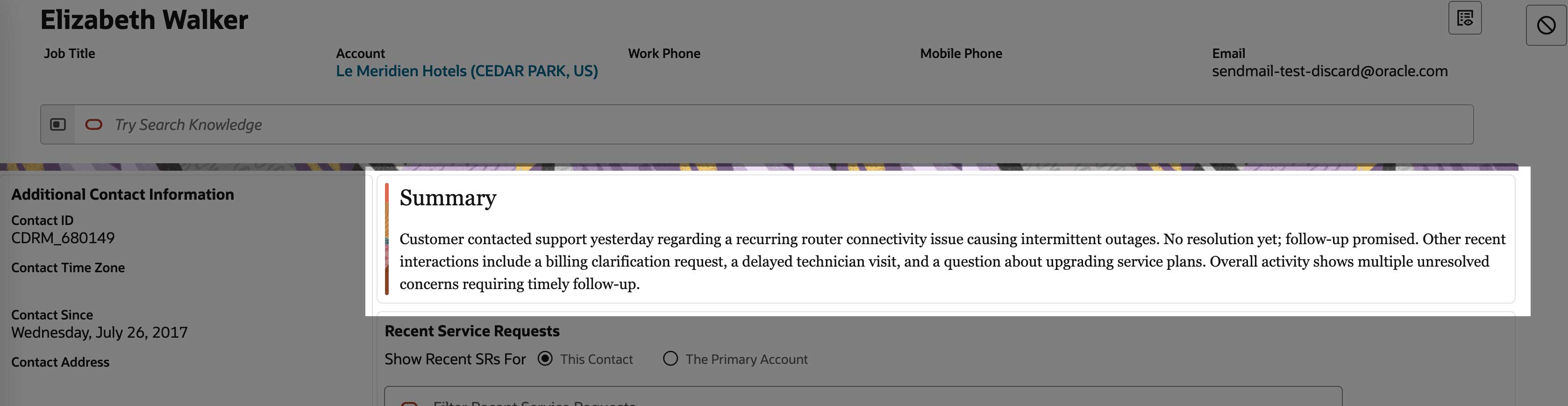
A ready-to-use AI Agent now analyses and summarises a contact's recent service interactions — service requests, phone calls, and chats — directly within the Service Console, and can be extended using Redwood extensibility tools if the default summary doesn't quite fit your process. For reps handling repeat contacts, having that history summarised rather than scattered across multiple records is a genuine time saver. Configured via Visual Builder.
Service Request Resolution Workflow Advisor Enhancements
The Resolution Workflow Advisor now supports human-in-the-loop handling, along with follow-up and rejection handling within the resolution workflow itself. In practice, this gives you control over when a Service Request is resolved autonomously versus routed for human review — which is exactly the kind of guardrail I'd want in place before leaning further into autonomous resolution. Setup required.
Operations Dashboard for Customer Service Managers
A new AI-powered workspace brings escalations, stalled service requests, and resolution performance together into one set of panels, surfacing the signals that actually need a manager's attention rather than everything at once. If you're currently piecing this view together from multiple reports, this is worth a proper look.
View and Customize Seeded Policy Models in AI Agent Studio
Policy models let you turn unstructured business policies into executable logic that agents can use for consistent, deterministic decisions — and in 26C, Service Center ships with seeded policy models you can view and customise directly, rather than building from scratch. A sensible starting point if you're just getting into policy-based agent decisions.
Contact and Channel Management
Duplicate Contact Detection
This is a larger scale feature and, in my view, one of the more practically useful items in this release. When an incoming chat or call is from an unknown contact and a rep starts entering an email address, the system now automatically checks existing contact records for potential matches before a new one gets created. Anyone who has had to clean up duplicate contact records at scale will appreciate this — it's a data quality problem addressed at the point of entry rather than after the fact.
Link Your Cases to External Documents and Systems
Case workers can now attach external links to a case — Jira issues, Confluence pages, SharePoint or Google documents, Oracle Fusion pages, and more — so related information in other systems is accessible directly from the case record. If your case workers currently juggle browser tabs to piece together context, this closes that gap. Potential setup required.
New Admin Page to Review Inbound Email Messages
A new Email Monitoring admin page lets administrators view the processing status of inbound service emails, search by message ID, and see details on each message. Small feature, but a useful one if inbound email processing issues have ever been hard to diagnose without digging through logs. Potential setup required.
Automatically Create a Contact from Inbound Email
New profile options let administrators automatically create a Contact from an inbound email when no existing match is found, including default first and last name handling for your implementation. This is my standout feature of the release — previously we've had to achieve similar capability via scripting and object triggers. Worth pairing with Duplicate Contact Detection above so you're not automating your way into more duplicates.
Differentiate Contacts vs Partner Contacts
The Contacts table on the Service Request Details page now supports a Contact Type column, making it easier to tell contacts and partner contacts apart at a glance in the list view. Setup required via Visual Builder Studio to add the field to your layout.
Extensible Recommendation Cards
Recommendation cards on the Service Request Details page and other SR pages are now built on a reusable framework using the UI Events Framework and AI Agent templates, rather than hard-coded logic. If you've wanted to customise which recommendations surface and when, this gives you a proper extensibility path to do it. Configured via Visual Builder.
Work Order Management Features
Reschedule, Cancel and Edit Field Service Activities from Service Work Order
This is a larger scale change worth planning your acceptance testing around. You can now reschedule, cancel, and edit Fusion Field Service activities directly from the associated Service Work Order, rather than needing to jump into Field Service to manage them. For organisations running Service Center and Field Service together, this closes a workflow gap that's been a genuine source of friction.
Manage Technician Preferences from the Service Profile Fold-Out View
Technician preferences and access schedules can now be managed directly from the Service Profile fold-out view, with new smart actions available, rather than requiring a trip to the full details page. A small usability improvement, but the kind that adds up over a lot of daily use.
As always, I've only covered what stood out to me across Help Desk and Service Center. There's more in Oracle's official readiness documentation, so it's worth reviewing the full release notes yourself — particularly if you're running Field Service alongside Service Center, or if you're planning any policy-based AI Agent work this quarter.
If you'd like to talk through how any of these features might land in your environment, I'm always happy to find time for a call or a coffee chat.