What's New in Oracle Fusion Service 26D
I've grouped what I think is worth your attention into AI and agentic features, core Service Center and Help Desk improvements, Oracle Fusion Field Service (OFS), and the platform and security changes that touch every Fusion customer. As always, I've flagged where setup or configuration is needed.
One note before we start: Oracle is still adding to the 26D readiness documentation, and the Service Center impact ratings haven't been published yet. I'll keep an eye on it, but check the official links at the end before you plan your testing.
Important: Classic HR Help Desk ends at 27B
Oracle has confirmed that Classic HR Help Desk will no longer be available from the 27B update, so every organisation still on Classic must migrate to Help Desk in the Redwood experience before their 27B update. The new deadline was announced at the Cloud Customer Connect session on 2 September 2026.
Migration is a proper piece of work: there's a migration guide, checklist, workbook and video series on Cloud Customer Connect, and Oracle recommends completing every validation step before moving on. If you haven't started planning, now is the time. Two quarters goes quickly once testing and change management are in the mix.
Oracle Fusion Service 26D AI and Agentic Features
Service Operations Workspace (Agentic App)
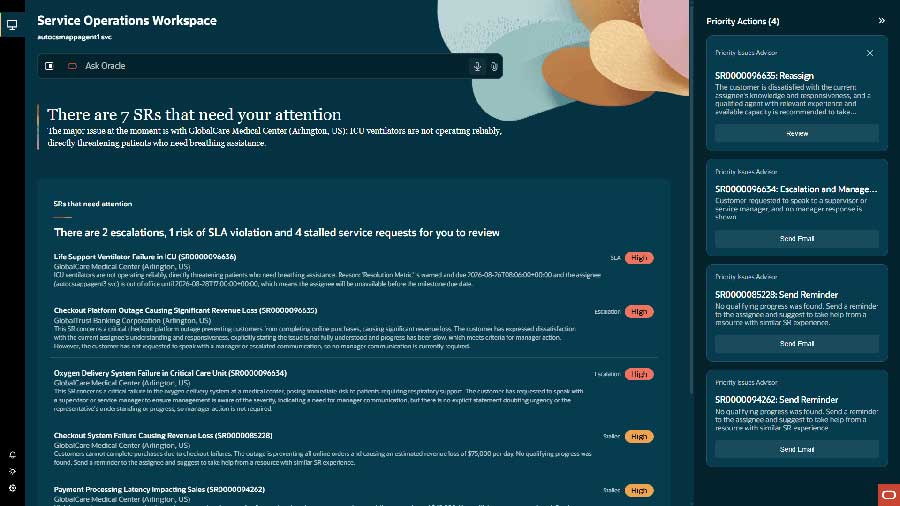
This is the standout for me. Instead of service managers hunting across dashboards for escalated, stalled or SLA-at-risk service requests, a team of AI agents looks at issue details, customer context, sentiment and staffing, and presents a single prioritised list of the SRs that actually need a manager's action. Each one comes with recommended actions such as responding to the customer, adding a team member or reassigning the issue.
Managers can also use Ask Oracle to dig further, including who has resolved similar issues before and what their current workload looks like, and they get AI-curated insights into where customer journeys could be better automated. Managers only see issues assigned to reps who report to them. Setup required: assign the new duty role and privilege to your Customer Service Managers.
Service Execution Workspace (Agentic App)
The companion piece for senior representatives. It brings together the SRs needing attention, the context to act on them, and recommended next actions, with Ask Oracle available to investigate. Reps can review, accept or modify AI-prepared resolutions before they reach the customer, and once an SR is resolved they can validate the generated procedure and submit it for knowledge article creation.
Oracle is clear that this is designed for guided, automation-related work and doesn't replace the full SR experience. SLA management and knowledge authoring aren't in scope for this release. Setup required: users need the Customer Service Representative and Service Super Rep job roles.
Collaborative Service Request
Every service desk has the moment where a rep knows they need help from another team but isn't sure which one. The new Raise a Related Request smart action lets a rep describe what they need, and an AI agent uses your routing guidance to work out whether it belongs as a Service Request, Help Desk request, Internal Help Desk request or Case. The rep reviews the draft, creates it, and Fusion links the two requests automatically.
The agent is available out of the box, but you need to load your routing guidance as a RAG document in AI Agent Studio, so the quality of that document will shape the quality of the routing. For now the conversation only appears on the original SR. Oracle says that will change in a near-future release.
Similar SRs Now Powered by an AI Agent
Find Similar SRs and the Similar SR recommendation card now use the Service Request Similarity Advisor AI Agent by default, moving away from the older Adaptive Search approach. You can tune the similarity threshold and number of results to suit your data. It's on by default, but check the prerequisites in the readiness notes (including RODS, Access Groups and the relevant profile options) so it behaves as expected.
Survey Authoring in Redwood Service Center
Administrators can now create and manage service surveys from Service Center Administration, using agentic chat to build and update surveys through natural-language prompts rather than a separate, more technical authoring tool. Small quality-of-life improvement, but one that business administrators will appreciate. No setup required, though it does need access to Fusion AI.
Choose the Model Behind Each AI Agent Studio Workflow
For anyone building in AI Agent Studio, you can now explicitly select the large language model each workflow uses, and that choice stays with the workflow across development, testing and runtime. That matters more than it sounds, because it stops platform model updates from changing your workflow's behaviour without warning. Deprecated models are now clearly identified too, so build a habit of checking for them each quarter. Note the Premium category has been renamed Balanced.
Core Service Center and Help Desk Features
Redwood Administration Across Service Center and Help Desk
This is a larger scale change. Most Fusion Service administration tasks now have Redwood pages replacing the Classic (ADF) versions, covering areas like SR statuses, severities, message types, SmartText, channels, queues, milestones and Knowledge setup. Help Desk gets the same treatment for categories, severities, channels and SmartText.
No setup is required, and a handful of the new pages are extensible through Visual Builder. If you use customised admin roles, verify access to the new pages before your administrators find out the hard way.
Escalation Status Label
Escalated SRs now show a pill-shaped label beside the subject with the escalation level, and reps can escalate, update or clear an escalation from the Smart Actions bar. A simple change, but one that makes critical customer situations obvious at a glance. Enabled out of the box.
SR Details Tab View Layout
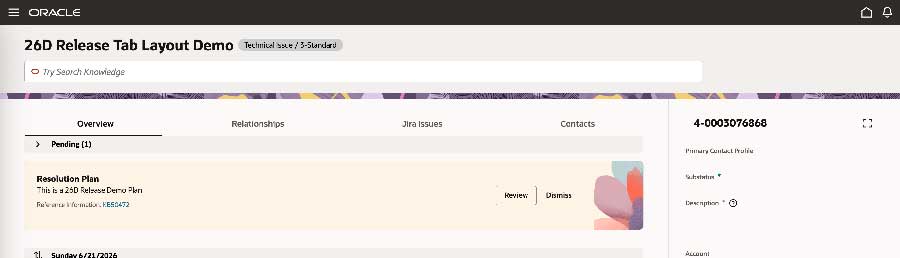
The SR Details page now supports a tabbed layout for organising standard and custom content, including mashups of other applications. Out of the box you still get a single layout. The tabs come through Visual Builder extensibility, so this one's for implementors. If your SRs carry a lot of detail, topical tabs are a good way to cut down on scrolling.
Redwood Activities List Page
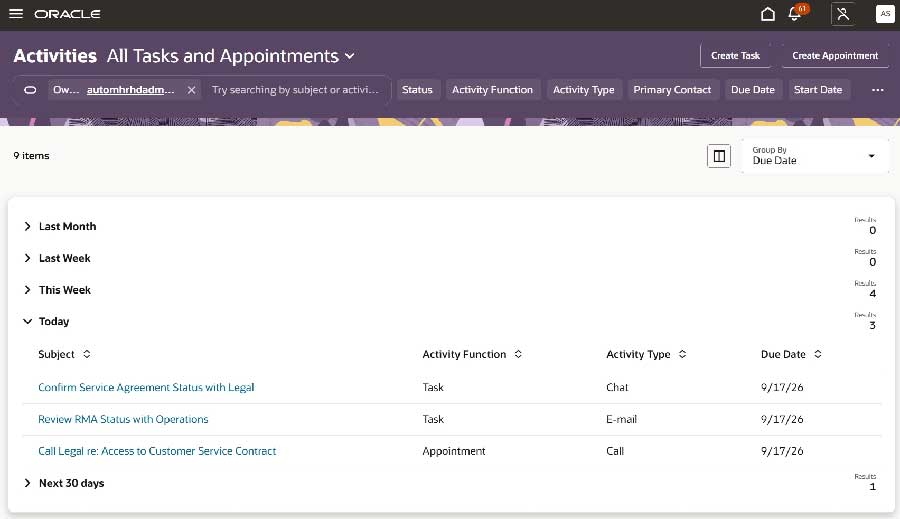
Tasks and appointments for Service Center, Help Desk and Case Management now have a single Redwood page with search, sort, create and edit, plus predefined saved searches like My Overdue Tasks. Custom saved searches aren't supported yet. Setup required: an administrator needs to add a Quick Action or card so users can get to it.
Case Issues for Complex Cases
Case workers can now manage multiple structured issues within a single case, each with its own category, status, evidence and progress. For grievances, complaints or investigations with more than one allegation, this is a much cleaner model than cramming everything into one record, and the Case Analyzer AI Agent will use the issue detail in its summaries. Setup required: enable it per Case Type through a profile option.
Faster Contact Handling on Cases
Two small improvements that save clicks every day, with no setup needed:
- Create contacts from the Case Details page with a single click from the Contacts folder.
- Select a contact relationship during case creation, rather than saving the case first and updating the relationship afterwards.
External Links on Help Desk Requests
Following the 26C release of external links on Cases, Help Desk agents can now link requests to Jira issues, Confluence pages, SharePoint or Google documents, Fusion pages and other systems. Administrators define link types so agents only need to enter a value like a Jira number. Setup required.
Asset Information Management for Service Users
Service users now have the privileges to use the Redwood Asset Information Management search, which is easier to use than the Classic installed-base asset page, with links between the service and supply chain asset details pages. No setup required.
Oracle Fusion Field Service Features
Debrief for Maintenance Work Orders
Mobile workers can now complete Maintenance Work Order debrief directly in OFS, with labour, expenses and parts posted straight to Oracle Fusion Cloud Maintenance through standard APIs. The standard flow no longer needs the Oracle Integration Cloud (OIC) Maintenance accelerator, which means one less integration to build and maintain, and that's always a win in my book. Crew activities are supported too. Setup required.
Upload Multiple File Attachments
Mobile workers can now attach files from the device file system or gallery, not just photos, to activities, work orders and assets. Think annotated plans, redlined drawings or configuration files generated by other apps. Setup required: enable Attach Files on the relevant forms and screens.
Past Activities Expanded Actions
Eligible past activities can now be moved, updated or reopened in more statuses (not just Started), within your configured past-update window, from both the application and the REST API. This reduces the risk of pending work getting lost after overnight processing and removes the need for custom end-of-day migration logic. No setup required.
Routing Configuration and Run APIs
The Routing API introduced in 26B expands with new public REST endpoints for routing profiles, plans, runs, rollback, reports and configuration filters. If you've built integrations on the 26B endpoints, note that several of the custom-actions paths are now deprecated in favour of the new 26D endpoints, so add a review to your integration backlog.
Platform, Security and Reporting Changes
Multifactor Authentication (MFA)
This is a larger scale change that affects every Fusion customer. New environment families from 25D onwards are on Oracle Cloud Infrastructure (OCI) Identity and Access Management, and users must enrol in MFA when they sign in, unless they use corporate single sign-on. Existing environments will be upgraded to OCI IAM on a separate schedule, after which MFA is optional. It's worth confirming with your identity team where your environments sit.
Redwood Page Tools for Administrators
- Contextual announcement banners can be added to Redwood pages through Visual Builder Studio for legal, compliance or business practice messages.
- Redwood appearance editor now lets you override colour-contrast checks to use your exact brand colour. Use this one with care, as those checks exist for accessibility reasons.
- Record issues on Redwood pages lets users capture a recording from the Settings and Actions menu to speed up troubleshooting with your support team. Requires privileges to be assigned.
Reporting and Analytics
If you extract data using BI Cloud Connector (BICC), review Oracle's Deprecated and New BI View Objects list, as deprecated view objects are no longer available for extraction and your BICC tasks may need updating. There's also the usual round of OTBI updates, covered in Oracle's What's Notable and Different in OTBI document.
As always, I've only covered what stood out to me. There's a lot more detail in Oracle's readiness documentation, and with the 26D material still being added to, it's worth checking back before your testing window. If you're on Classic HR Help Desk, please don't leave that migration to the last quarter.
If you'd like to talk through how any of these features might land in your environment, or want a hand planning your Redwood migration, I'm always happy to find time for a call or a coffee chat.
Links to Release Documentation
- Service Center What's New 26D
- Help Desk What's New 26D
- Oracle Fusion Field Service What's New 26D
- Common Technologies and User Experience What's New 26D
Author: Kevin Stephens