What's New in Oracle Fusion Sales 26D
On the AI side, Forecast Advisor gives sales managers an AI-generated read on forecast health, and AI Agent Studio gains two features I've been waiting for: CI/CD integration and a proper regression testing suite. Those two won't make headlines, but they're what make agentic solutions supportable in the long run.
I've grouped what I think is worth your attention across Sales Force Automation, Sales Performance Management, Subscription Management, and Common Technologies and User Experience. As always, I've flagged where setup or an opt-in is needed.
Oracle Fusion Sales 26D AI and Agentic Features
AI-Powered Forecast Guidance with Forecast Advisor
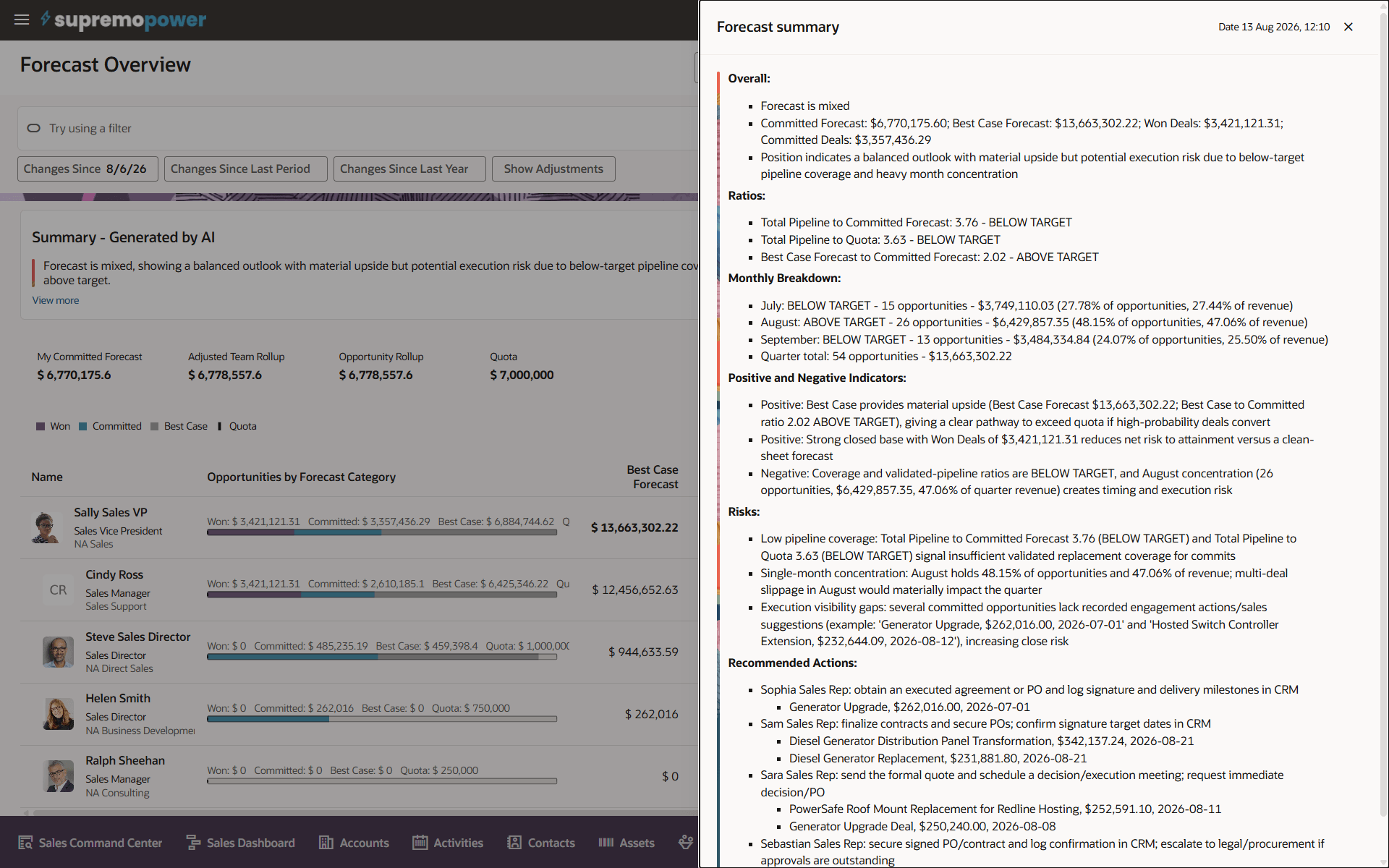
Forecast Advisor adds an AI-generated summary to the Forecast Overview page in Sales Forecasting. It gives sales managers a quick read on current-quarter forecast health, position against quota, pipeline coverage, trends, monthly breakdowns, risks and recommended actions, with the full insights available in a Forecast summary drawer.
Anyone who has sat through a forecast call where the first twenty minutes are spent working out where the numbers actually stand will see the value here. The time goes back into coaching and the deals that will move the result. Setup required: summaries are generated by running the Sales Forecast Advisor (or Sales Forecast Advisor Orchestration) agent team in AI Agent Studio. Oracle recommends generating summaries for every lower level of your resource or territory hierarchy, so executives get an accurate roll-up rather than a partial picture.
Ingest Contract Documents Using AI
Most organisations have a pile of contracts living outside the system as PDFs, Word documents and scanned files in shared drives. Getting them into Enterprise Contracts has traditionally meant someone keying them in by hand, one at a time. Contract Ingestion lets you upload documents in batches, then uses AI to scan them, work out the contract type, and extract key terms before creating the contract records.
The part I like is that it's a guided, reviewable process rather than a black box. Users review scan results (duplicates and unreadable files are flagged), check the proposed classifications and extracted values, and correct them before anything is created. Setup required: you define a Contract Type Classification Policy and a Contract Key Terms Extraction Policy and upload them to AI Agent Studio, and users need the Manage Contract Ingestion Duty role. The quality of those policy documents will largely decide the quality of the output, so treat writing them as a proper piece of analysis.
Redwood: Contract Expert
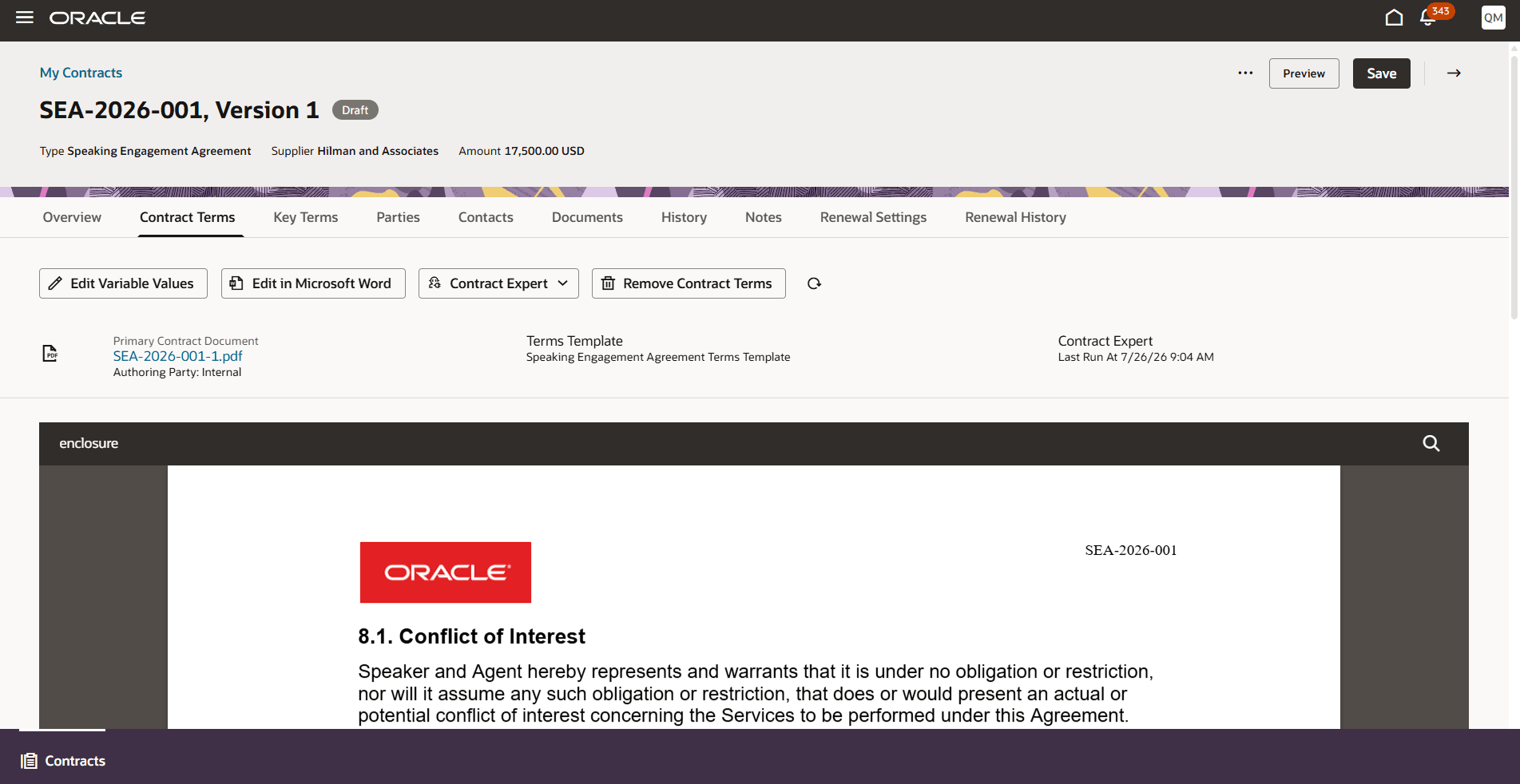
Contract Expert now evaluates structured contract terms against a policy document in Redwood and the Word Add-in. When terms are added from a terms template enabled for AI policy document rules, Contract Expert runs automatically, adds the required clauses and presents optional clauses in a drawer with the reason each one was selected. If contract values change, users can run it again, and manual changes are preserved.
Being able to see why a clause was chosen is the thing that will build trust with legal and commercial teams, who are rightly wary of anything that changes contract language on its own. There's also an embedded PDF preview on the Contract Terms tab, so users can check the result without leaving the page. Setup required.
Contracts and Subscription Management
Redwood: Renew Contracts
Contract and contract-line renewals move from the Classic (ADF) experience into Redwood. You can set renewal rules at the contract type level (manual or automatic renewal, internal approval, customer or supplier acceptance, minimum duration, co-termination and terms version), override them per contract, and renew directly from a Renew action or in bulk through the Renew Contracts and Lines Using Renewal Settings scheduled process. There's REST support for renewal scenarios too.
Note the opt-in is switched on by default, so this will appear unless you opt out. Renewal is supported for Active or Expired contracts on their latest version with an end date, and fulfilment line renewal and contract consolidation aren't supported yet. Set your contract type renewal rules before anyone runs the scheduled process in anger.
Generate Oracle CPQ Renewal Quotes from Subscription Renewals
This closes a gap that has typically needed manual handoffs or custom integration. Once the Subscription Auto Renewal process creates renewal drafts, the renewal flow can create a renewal opportunity where needed and send the subscription to Oracle CPQ through the Business Messaging Framework to create a renewal quote. Success and failure callbacks show up in the Renewal Navigator, with step-level status and the option to retry failed steps.
It supports Zero Touch, Low Touch, High Touch and Manual renewal paths. Setup: two profile options need to be enabled for the CPQ and opportunity integrations. Parts of the readiness material read a little like design notes (payload size limits for large subscriptions, for example), so I'd test this carefully with your largest and most complex subscriptions before relying on it.
Support Subscription Products for Asset-Based Ordering
This is the larger scale change in Subscription Management and one to plan properly. Asset Lifecycle Management can now create assets and sold-as asset groups for eligible subscription products, so subscriptions get a traceable installed-base representation that supports amendments, renewals, terminations and coverage changes through asset-based ordering (ABO).
This is a data model decision as much as a feature. Items need to be set up correctly in Product Information Management, the ABO opt-in needs to be enabled in Order Management, and existing subscriptions need a scheduled process run to create their assets. Once in place, subscription-managed assets should only change through the subscription and fulfilment lifecycle, not by direct edits in Asset Lifecycle Management. Get the item setup right first and the rest follows. Get it wrong and you'll be unpicking it for a while.
Protect Subscription Charge Prices with Ceiling Limits
You can now set an optional ceiling price on individual subscription charges. When a pricing term, manual adjustment, renewal uplift, amendment or resumption would push the price above the ceiling, Subscription Management caps it and shows the difference as a price-protection adjustment in the price waterfall.
It's a simple, practical way to honour pricing commitments made to customers without relying on someone catching it at renewal time. No setup is needed to enable it, but ceilings can only be set while the subscription product is in Draft, a specified total charge amount takes precedence, and usage charges aren't supported. It's also available through REST.
Extending Redwood Sales
Call a Smart Action on Button Click
Administrators can now put a button or link anywhere in a Redwood page that calls a Smart Action, rather than users having to find it in the action bar. It's configured in Visual Builder Studio with a single function call that passes the Smart Action name. It's a small change for implementors, but it means you can put the action users need most right where they'll look for it, without building a custom action from scratch.
Contextual Announcement Banners and Brand Colours
- Contextual announcement banners can now be added to Redwood pages through Visual Builder Studio, as info or warning messages. They're handy for compliance reminders or business practice notes on specific pages.
- The Redwood appearance editor now lets you override colour-contrast checks and use your exact brand colour as the primary colour. Use it with care. Those checks exist for accessibility reasons, and a brand colour that's hard to read helps nobody.
AI Agent Studio Grows Up
Two AI Agent Studio features in 26D deserve more attention than they'll probably get. Building an agent is the easy part. Changing it six months later without breaking something is where the real work starts, and these two go straight at that problem.
CI/CD Integration for AI Agent Studio
AI Agent Studio applications and workflows can now be managed in a Git repository and deployed through your organisation's CI/CD pipeline, rather than published by hand. That means branches, reviews and approvals before anything reaches production, plus a traceable history of what changed and when. If you already run proper release management for your other Fusion extensions, your agents can now follow the same path. Requires AI Agent Studio access.
Test and Validate Workflows with ATLAS
ATLAS (the AI Agent Studio Testing and Lifecycle Automation Suite) brings repeatable regression testing to agentic workflows. You record a scenario once, including the data it relies on, then replay it locally, in your CI pipeline or when comparing model configurations. Tests can check exact routes and outputs, or use semantic judging for things like response quality and grounding, and reports cover failures, latency and AI Unit usage.
It's a bit like a band recording its rehearsals. You find out what went wrong before the audience does. If your team is building anything beyond a simple agent, I'd make ATLAS part of your delivery approach from the start rather than retrofitting it later.
Platform, Security and Reporting Changes
Multifactor Authentication (MFA)
This is a larger scale change that affects every Fusion customer. New environment families from 25D onwards are on Oracle Cloud Infrastructure (OCI) Identity and Access Management, and users must enrol in MFA when they sign in, unless they use corporate single sign-on. Existing environments will be upgraded to OCI Identity and Access Management on a separate schedule, after which MFA is optional. Confirm with your identity team where your environments sit, and warn your users before the sign-in experience changes.
Reporting and Analytics
If you extract data using BI Cloud Connector (BICC), review Oracle's Deprecated and New BI View Objects list. Deprecated view objects are no longer available for extraction, so any BICC tasks still pointing at them will need updating before your downstream reporting notices. There's also the usual round of OTBI updates, covered in Oracle's What's Notable and Different in OTBI document.
As always, I've only covered what stood out to me. There's plenty more in Oracle's readiness documentation, including a long list of Oracle CPQ updates for customers running CPQ in Fusion, so it's worth reviewing the full release notes for the modules you use.
If you'd like to talk through how any of these features might land in your environment, particularly the subscription and asset-based ordering changes, I'm always happy to find time for a call or a coffee chat.
Links to Release Documentation
- Sales Force Automation What's New 26D
- Sales Performance Management What's New 26D
- Subscription Management What's New 26D
- Common Technologies and User Experience What's New 26D
Author: Kevin Stephens