What’s New in Oracle Fusion Service Release 26B

If you were wondering when AI would start to feel like a genuine day-to-day tool rather than a novelty, I think 26B is the release where it starts to get real.
As always, I’ve highlighted what I feel are the most significant features across the four main Service modules. I’ve kept the usual AI / Core split to help you navigate, and there’s an important deprecation callout you should not ignore if you’re running Classic HR Help Desk. Let’s get into it.
Important: Classic HR Help Desk End of Life
Oracle have issued a reminder that the Classic HR Help Desk must be migrated to the Redwood experience prior to release 26D. If you are still running Classic HR Help Desk, this is not something you can defer indefinitely — 26D will be here before you know it.
The Redwood Help Desk experience is genuinely better — more intuitive, more capable, and where Oracle’s investment is going — so now is the time to plan and execute your migration. Needless to say, Kyte can help if you need support getting there.
AI Related Features
— Service Center —
AI-Powered Action Suggestions in the Action Bar
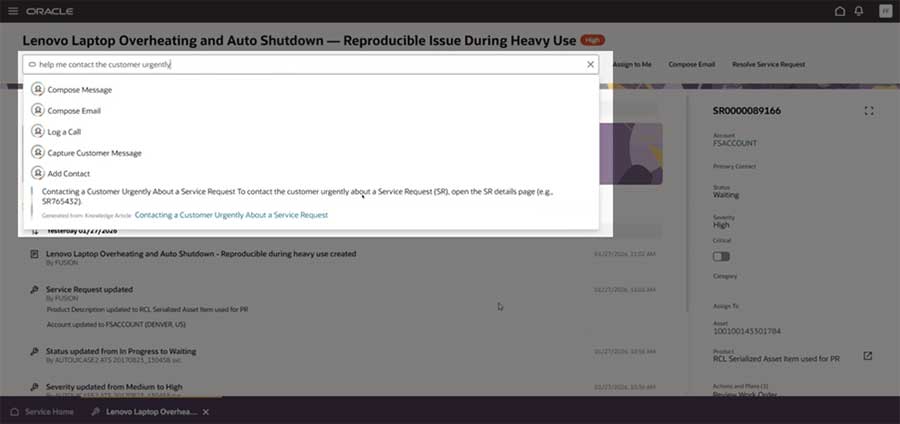
This is the headline AI feature for Service Center in 26B and it’s a substantial one. The system can now surface AI-powered action suggestions directly in the SR Action Bar, helping agents take the right next step faster without having to figure it out themselves. It’s listed as “larger scale” impact in the release notes, which tells you Oracle are expecting this to meaningfully change the way agents work through their queues. It does require some setup to enable, but this one is absolutely worth prioritising.
Iterative AI Recommendation Cards for Faster Resolutions
Building on Oracle’s ongoing investment in AI-assisted resolutions, this feature introduces iterative AI recommendation cards that agents can work through progressively to get to a resolution faster. Rather than a single static suggestion, the experience is more conversational and adaptive. A solid improvement to the resolution workflow.
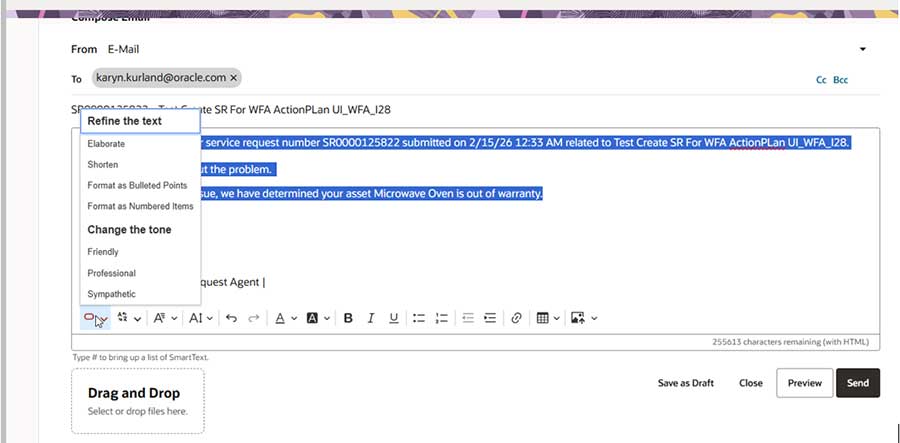
Rapidly Improve Message Content with Generative AI
Agents can now use Generative AI to rapidly improve the quality of outbound message content on Service Requests. Think grammar, tone, clarity — all the things that can make the difference between a response that satisfies a customer and one that escalates the situation. A quick win for anyone managing a high-volume service operation.
SR Summarisation is Now a Configurable AI Agent
SR Summarisation has been upgraded from a fixed AI feature to a fully configurable AI Agent. This is significant because it means you can now tailor the summarisation behaviour to your specific needs rather than accepting Oracle’s out-of-the-box output. Administrators can configure the agent to focus on what matters most for their business. Setup is required, but the flexibility this unlocks is well worth it.
Smart Actions to Launch AI Agents in Service Center
Administrators can now configure Smart Actions that launch AI Agents directly from within the Service Center work area. This is a great mechanism for embedding contextual AI assistance at the point of need — whether that’s triggering an agent to assist with troubleshooting, knowledge retrieval, or guided resolution. It requires App Composer configuration to implement.
AI Usage, Effectiveness and Engagement Reports
How do you know if your AI investment is actually working? 26B introduces new analytics reports covering AI usage, effectiveness, and engagement within Service. This gives administrators and managers visibility into how agents are using AI features, how often recommendations are being acted on, and where there might be room to improve adoption. For anyone building a business case for AI — or defending one — this kind of reporting is gold.
— Case Management —
Enhance the Case Analyser AI Agent with Custom Starter Questions
The Case Analyser AI Agent can now be enhanced with custom starter questions, allowing administrators to tailor the initial AI-assisted case analysis to their specific business context. Rather than relying on generic opening prompts, you can guide the agent toward the information that actually matters for your case types. Setup is required, but this is a nice level of control for organisations running complex case management scenarios.
— Help Desk —
Improved Employee Self Service Assistant
The Employee Self Service Assistant in Help Desk has received a meaningful upgrade in 26B. It now uses RAG (Retrieval Augmented Generation) to set Product and Category on help desk requests, and has been upgraded to run on the workflow agent architecture. In plain English: the assistant is smarter, better at understanding what the employee actually needs, and better integrated with the underlying Help Desk platform. If you’ve implemented the self-service assistant, this upgrade should deliver a noticeably better employee experience.
— Digital Customer Service —
AI Agent Service Surveys for DCS and Embedded Service Chat
Oracle have introduced AI Agent-powered service surveys for both the Digital Customer Service portal and Embedded Service Chat. This means you can now deploy automated post-interaction surveys via an AI Agent rather than relying on static survey forms — enabling a more conversational, contextual feedback experience for customers. Both features require setup to enable. If customer satisfaction measurement is a priority for your organisation (and it should be), this is worth exploring.
Core Features
— Service Channels —
Automatically Respond to New Inbound Email Requests
Service channels can now be configured to automatically respond to new inbound email requests. This is a great feature for managing customer expectations — getting an immediate acknowledgement out the door while the request is being assigned and worked. It’s a straightforward setup feature but one that can make a real difference to perceived responsiveness, particularly for high-volume email channels.
Notification Assistant Available as a Workflow Agent
The Notification Assistant has been made available as a Workflow Agent in 26B. This means notifications can now be incorporated into broader agentic workflows rather than existing as a standalone feature. If you’re building out automated processes in Service, this integration point is useful to have. Setup is required to configure.
Store the Problem and Solution for Each Chat
A simple but genuinely valuable addition: the problem and solution from each chat interaction can now be stored against the record. This supports better reporting, knowledge capture, and the ability to surface relevant resolutions for similar future interactions. One of those features that seems small but compounds in value over time as your data set grows.
— Service Request Management —
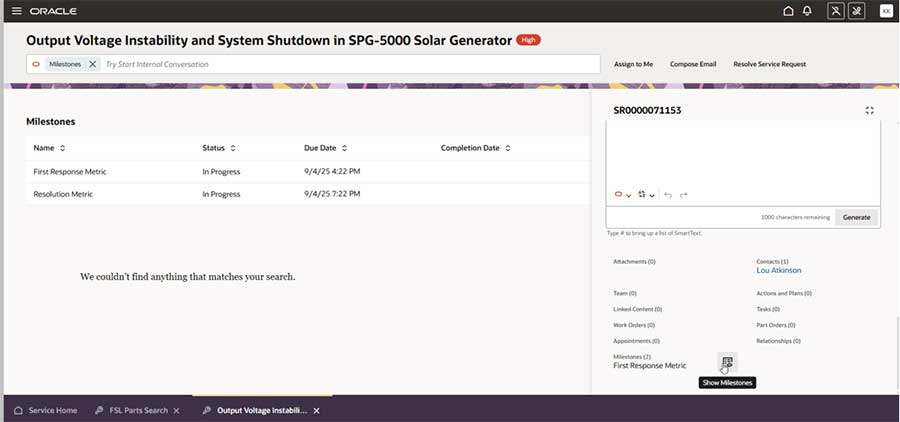
View Milestones in the New SR Details Page
Milestones are now visible directly within the new SR Details page in the Redwood UI. Previously, agents may have needed to navigate away or dig through related information to check milestone status — having it front and centre on the SR is a practical improvement for anyone managing SLA-sensitive workloads.
View which Linked Knowledge Articles Were Shared and Helped Solve the SR
Agents and administrators can now see which Knowledge Articles were shared with customers and, importantly, which ones actually contributed to resolving the SR. This is valuable on two fronts: it gives visibility into your knowledge base’s effectiveness, and it feeds back into improving article quality over time. A nice closed-loop addition to the knowledge and service integration.
Cancel Action Plans and Solo Actions on SRs
Users can now cancel Action Plans and Solo Actions directly on Service Requests. Previously, the options for managing in-flight action plans were somewhat limited — this gives agents and administrators more control over the SR lifecycle when circumstances change mid-process. A small-scale change in Oracle’s terminology, but one I know from experience comes up frequently in real-world service operations.
— Work Order Management —
Copy Service Work Orders
Oracle have added the ability to copy Service Work Orders in 26B — and this one is listed as “larger scale” impact, which reflects how frequently this kind of functionality gets requested. Rather than rebuilding similar work orders from scratch, users can now copy an existing one as a starting point. A real productivity win for teams managing recurring or template-based field service work.
Service Profile Foldout Page Usability Enhancements
The Service Profile foldout page has received usability enhancements in this release, also rated as “larger scale” impact. Oracle have clearly invested some attention here based on user feedback, and the result should be a more intuitive and efficient experience when working with service profiles. No setup required — this one lands automatically for Redwood users.
— Knowledge Management —
SharePoint Connector and Web Crawler Connector
Two significant additions to Knowledge Management search in 26B: a SharePoint Connector and a Web Crawler Connector are now available. This means you can extend your Fusion Knowledge base to surface content from SharePoint and external web sources alongside your native knowledge articles — giving agents and customers a much broader and more connected knowledge experience. Both connectors require setup to configure. If your organisation has substantial knowledge content living outside of Fusion, these connectors are worth evaluating seriously.
A couple of authoring improvements worth noting: authors can now use lists when writing knowledge articles (finally!), and content attributes can be marked as searchable or as filtering criteria. The latter gives administrators much more control over how knowledge content is indexed and surfaced in search. Also new is the ability to administer Knowledge User Groups, providing better governance over who has access to what content.
Links to Release Documentation
There’s plenty more in 26B than I’ve been able to cover here. As always, I’d encourage you to review Oracle’s official readiness documentation for the full feature list and configuration guidance.
Author: Kevin Stephens