What’s New in Oracle Fusion Sales Release 26B

As always, I’ve highlighted what I feel are the most significant or interesting features for this release. I’ve split things into “AI Related” and “Core” features to make it easy to navigate — jump to whichever section is most relevant to you.
There’s also a shout-out to my Australian readers — there’s a feature in this release that’s directly relevant to you, so don’t skip the callout below!
AI Related Features
Agent-Powered Account Intelligence
This is one of the headline features for 26B and it’s a big one. Sales reps can now get AI-generated insights on customer priorities and recent changes directly from the Account record. Rather than manually trawling through activity history or external news sources, the agent surfaces what’s relevant — helping sellers walk into conversations better informed. It requires some setup to enable, but for organisations that are serious about intelligent selling, this is absolutely worth the effort.
Contracts AI Counsel
Oracle have introduced an AI Counsel capability for Enterprise Contracts. Think of it as having an AI reviewer looking over your contract terms and flagging potential issues or areas requiring attention. This is an opt-in feature that also requires configuration, so it won’t land automatically — but if you’re using Enterprise Contracts, it’s well worth evaluating as part of your contract lifecycle management process.
Redwood Account Summary Upgraded to Agentic Framework
The Account Summary in the Redwood UI has been upgraded to run on the new agentic framework. This means it’s more dynamic, more configurable, and better positioned to evolve as Oracle continues to invest in agentic AI. The impact is described as “small scale” in the release notes, but the architectural shift underneath is meaningful — it sets the foundation for richer account intelligence in future releases.
Initiate Conversation with AI Agent from Action Bar
Users can now start a conversation with an AI Agent directly from the Action Bar in Sales. This makes AI assistance far more accessible — rather than navigating away or opening a separate panel, users can engage with agents in context, right where they’re working. It requires setup to enable, but the user experience improvement here is significant.
Create Sales Contacts from Email Signatures Using Agentic AI
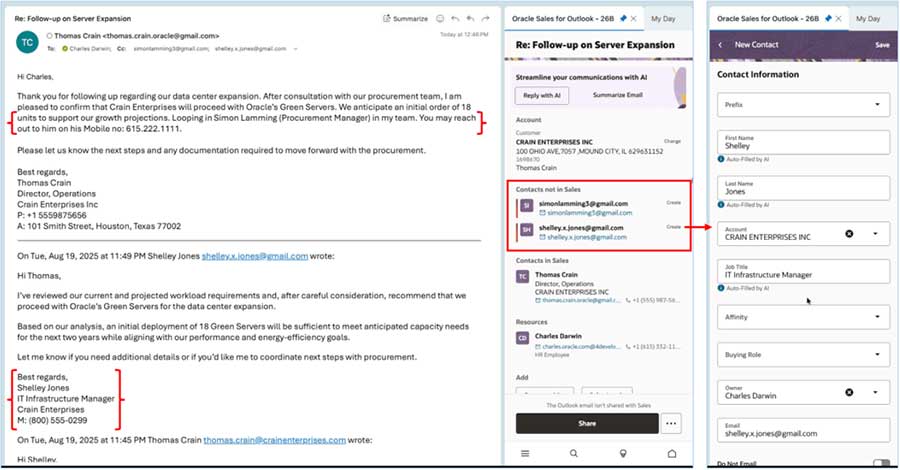
This one is a real time-saver. Via the Sales for Outlook integration, users can now leverage agentic AI to automatically extract contact details from email signatures and create new Contact records in Fusion Sales. If your sales team is anything like the ones I’ve worked with over the years — juggling inboxes, meetings, and a mountain of follow-ups — anything that reduces manual data entry is a win.
Note this requires App Composer configuration to enable.
AI Agent Invocation via REST-Based Smart Actions
Administrators and developers can now invoke AI Agents via REST-based Smart Actions through the CX Framework. This opens up a lot of flexibility for organisations that want to trigger AI agents from custom UI components or external processes. It’s an App Composer feature, so it’ll appeal most to those who are customising their Redwood experience.
AI-Powered Incentive Compensation Insights
There are a few genuinely exciting features landing in Incentive Compensation this release:
- Get Plan Insights for Administrator — Admins can now use AI to get intelligent insights into compensation plan performance, helping them identify issues and opportunities without having to dig through reams of data.
- Payee Incentive Advisor & Coach — Sales reps get an AI-powered advisor that can help them understand their compensation position, what’s driving their earnings, and what actions they can take to maximise performance. This is the kind of feature that can genuinely boost engagement with the IC module.
- Assign Participants to Plans Conversationally — Plan administrators can now assign participants to compensation plans using conversational AI. Less clicking through screens, more just telling the system what you want. Love it.
Core Features
Hey Australian customers — this one’s for you!
New Additional Identifier Types for Australian Superannuation Funds
Oracle have added new identifier types in Accounts and Contacts to support Australian legislative requirements for Superannuation Funds. This is a small-scale change but a meaningful one if you’re operating in the Australian financial services space — it means your Fusion Sales data model can now natively accommodate the compliance requirements around super fund identification without needing to resort to workarounds or custom flexfields.
This one enables automatically with no setup required, which is always nice.
Accounts and Contacts Duplicate Checker
Duplicate management has always been a sore point in CRM implementations (I’ve cleaned up more than a few data quality messes over the years, trust me). This release brings a Duplicate Checker for Accounts and Contacts in the Redwood UX, helping users identify and manage potential duplicates before they become a problem. No setup required — this one should just be there for Redwood users.
Enable CPQ in Adaptive Search
A couple of notable expansions to Adaptive Search for CPQ customers: CPQ Parts, Models and BOMs can now be enabled in Adaptive Search, as can CPQ Quotes and Quote Lines. If you’re running CPQ alongside Fusion Sales, this is a solid quality-of-life improvement — your users will be able to search across CPQ data the same way they search across other Sales objects. Both features require setup to enable.
Account Address Picker in CX Sales Mobile
The CX Sales Mobile app now includes an Account Address Picker, which sounds simple but makes a real difference for field sales teams. Users can properly select and associate addresses when working on the go, rather than hitting limitations in the mobile experience. Another App Composer feature, so it needs to be configured to surface.
Automatically Generate Purchasing Change Orders for Contract Amendments
For organisations using Enterprise Contracts with Oracle Procurement, this is a useful automation: when a contract amendment is made, the system can now automatically generate the corresponding Purchasing Change Order. This removes a manual step in the process and reduces the risk of amendments being actioned in one place but not the other. It’s an opt-in feature that also requires some setup to configure.
Migrate Layouts from Fuse UI to Redwood
For those of you still working through your Redwood migration (and given Oracle have been clear about the Classic UI end-of-life timeline, the clock is ticking), there’s now a Visual Builder tool to help migrate layouts from the Fuse UI to Redwood. Anything that reduces the migration effort is welcome — if you haven’t started your Redwood migration yet, please don’t wait. The Classic UI is being decommissioned and the sooner you start, the less painful it will be. Kyte can help if you need it!
Drill into Rollup Field Values for Custom Objects
A handy one for administrators and power users: you can now drill into rollup fields on custom objects to inspect the individual components and values that make up the rollup calculation. This makes it much easier to troubleshoot unexpected rollup results without having to resort to data exports or manual analysis. App Composer feature.
Links to Release Documentation
As always, I’ve only been able to cover my personal highlights from this release — there’s plenty more detail in Oracle’s official readiness documentation. I’d strongly encourage you to review these docs for the full picture, including configuration guidance for the features covered above.
Author: Kevin Stephens